Find Keywords

Quick Overview : WordTracker
Need more than a keyword research tool? How about a market research tool. Take competitor keywords, in-depth PPC and SEO insights, data from Google, and our own proprietary search technology…all you have to do is start researching.
Videos
Gallery


Description
Description WordTracker
Wordtracker is a relevance-based online keyword research tool to help marketers improve their search engine rankings and page traffic.
What is WordTracker?
WordTracker is a free keyword generator designed to help digital marketers identify relevant terms and phrases to target to improve their search engine page (SERP) rankings and traffic.
The tool also allows for competitive analysis to find out what search terms your competitors are ranking for on the SERPs.
Which can be useful to know what works for the competition and how to readjust your SEO strategy to be more competitive.
Moreover, since keyword research and content creation are two closely related techniques, WordTracker can also be qualified to some extent as a content marketing.
Thanks to the keyword suggestions that WordTracker provides by collecting data from search engines, WordTracker can be useful for finding content ideas for your blog posts, videos or any other type of content.
Unlike some keyword research tools, WordTracker not only provides search queries from Google, but also search engine data from YouTube, Amazon, and eBay.
So if in addition to optimizing your content for Google pages, you also produce YouTube videos or sell products on Amazon, WordTracker is probably still a good choice as a keyword research tool.
WordTracker: How to use the tool?
- To get started, head over to the official WordTracker page.
- Click on the drop-down box labeled “Search With” to choose a search engine from Google, YouTube, Amazon, and eBay.
- Click on the drop-down list labeled “Territory” to choose a country.
- Then enter the search bar, enter a main keyword and click on the “Search” button.
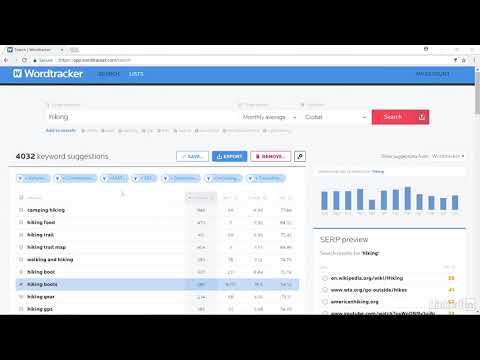
The tool will then generate a list of relevant keyword suggestions on screen with individual metrics to assess the profitability of each term.
By default, the metrics “Search volume”, “Competition level”, “IAAT”, “Only questions” and “+GSC Keyword Only” are displayed.
- But by clicking on the “Metrics” button, you can uncheck/check to choose the metrics that interest you (3 metrics maximum).
In the screenshot above, we can see that WordTracker generated over 650 keyword suggestions.
- But by clicking on each metric, you can bring up a gauge and further refine the list of keywords.
This will likely narrow the list down to relevant terms that most closely match your search criteria.
- Next to the “Metrics” button, you have 3 other buttons to display WordTracker results by PPC, SEO and GSC data.
In the left sidebar, you have a search bar labeled “FILTER RESULTS BY TEXT” to further filter the list of generated keywords.
- To do this, enter a search term then click on “INCLUDE” OR “EXCLUDE” to tell the tool to include or exclude the entered keyword from the results list.
A little further down you have the “My List” section where you can create your own keyword lists.
- A list entitled “Untitled List” is proposed by default. Click on a pen logo to rename it.
- Click on a keyword in the results generated by WordTracker to add it to your own list.
- Click on the “Save” button to save and export the list.
- By scrolling down the page, you will discover on your left a section of secondary keyword suggestions.
By clicking on the small + placed in front of each of these suggestions, you can add it to the large list of keywords. The tool will then display the individual metrics for the newly added term.
- Click on the “Save” button to save the WordTracker results and on “Export” to export them to a spreadsheet.
You can then use this file on other tools or share it with your collaborators if you are working in a group.
- Click on “Remove” to overwrite the data generated by WordTracker and on “Import” to import an existing file of keywords.
- To analyze the domain of a competitor’s site, click on the “Inspect” page located in the horizontal menu bar.
- Enter the URL of the competitor’s site then click on the “Inspect” button.
After a few moments, the tool will display a series of information about the inspected site.
As we can see on the capture below, WordTracker displays the title, the metadescription as well as the important headings that can be found on the site. On your left, you also have an overview of the site.
The tool also displays a score out of 100 for certain SEO metrics such as:
-
- Citation Flow : To designate the quantity and quality of backlinks available to the website
- Trust Flow: To designate the level of reliability of backlinks obtained by the site
- Page Speed : To display the loading speed of the pages of the site
- Optimization: To evaluate the level of optimization of the site for the search engines
- Difficulty : To estimate the level of difficulty to meet to exceed the site on the pages of the search engines.
A little further down, you will find a list of keywords for which the competitor ranks high on search engines and a list of relevant keyword opportunities that the competitor failed to optimize.
You can then bet on these keywords and outperform your competitors on important terms in your industry.
WordTracker: The Features
- SEO
- Tool Keyword Research Tools
- Market
- Competitor Keywords In-
- Depth CPC
- SEO
Insights: Pros and Cons
Pros
- Keyword Rankings
- CPC (Cost Per Click)
- Word Suggestions Alternative Keywords Keyword
- Difficulty
Cons
- Some features are limited in the free version
- No chat support
WordTracker: Pricing
WordTracker is available in 3 plans with a 7-day trial period:
Bronze $27 per month
- 1,000 Word ResultsSilver
- Territories
$69 per month
- 5,000 Keyword Results
- 13 Gold Territories
$99 per month
- 10,000 keyword results per month
- Over 200 territories
- API access.
By choosing an annual subscription, you can save up to 40% on each plan.
About WordTracker
Wordtracker is a company with the same name as its search engine optimization tool. It was started by Mike and Andy Mindel. Their objective in designing this tool is to provide reports on the various terms used by Internet users in search engines.
Over time, this goal has changed due to the evolution of SEO. A situation that forced the founders to develop other basic concepts related to keyword research like the KEI.
That said, Wordtracker helps businesses effectively engage with their audience through the internet. For this, the tool offers on its platform the best data regarding keyword research and offers detailed reports.