
Check Redirect Path

Quick Overview : Ayima - Chrome Web Store (Plugin)
Want to check the redirect path of a URL? Ayima Redirect Path is a redirect checker.
Videos

Gallery
Description
Ayima Redirect Path
Web pages that return to error messages not only affect the user experience, but also harm the SEO of sites.
This is the case of 404 errors which exhaust the crawl budget. The same goes for redirects when they are not set up correctly.
The ideal is to check your redirects in order to diagnose these kinds of problems in order to correct them before they affect your site negatively.
Fortunately, there are tools like Ayima Redirect Path that help identify issues with HTTP response codes.
Through this description, we learn about the Ayima Redirect Path tool and how to use it to identify these problems on your site.
We then go through the different features of the tool and finally, we discover its benefits for SEO.
What is Ayima Redirect Path Tool?
The Redirect Path tool is an extension to control the redirect path of a URL.
This handy plugin gives you information related to domain redirects and where they may lead. It also allows to monitor the status code of a given page.
Indeed, status codes inform internet browsers if a page has loaded successfully, has been redirected or has encountered errors. By using the Redirect Path extension, you will observe the status codes returned by your pages.
So you can find issues with your site or detect redirects that could negatively impact your organic ranking performance if done incorrectly.
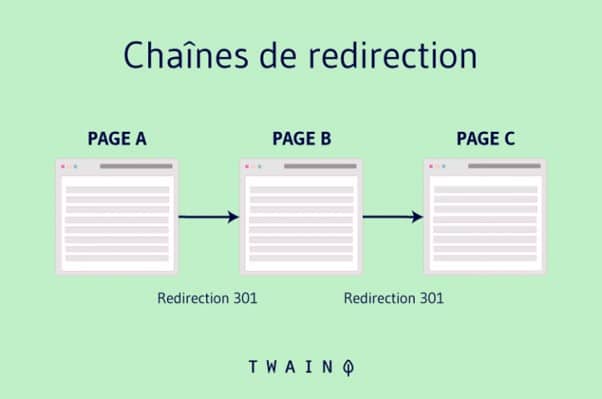
We speak of redirection when the request for one page is transferred to another, in other words, the request for page A loads page B.

https://www.twaino.com/wp-content/uploads/2021/ 10/Redirection-302-2.png
redirect path is a tool that allows you to see if the redirect links go through a safe network or not.
From then on, you can identify redirect paths that can slow down your loading speed or 302 redirects that might be updated to 301.
Who is Ayima Redirect Path tool for and why should you install it?
This extension is mostly used by marketing consultants and SEOs. Web developers also commonly use it to diagnose server and web-related issues.
Apart from being free, Ayima Redirect Path provides instant results on the status of your URLs.
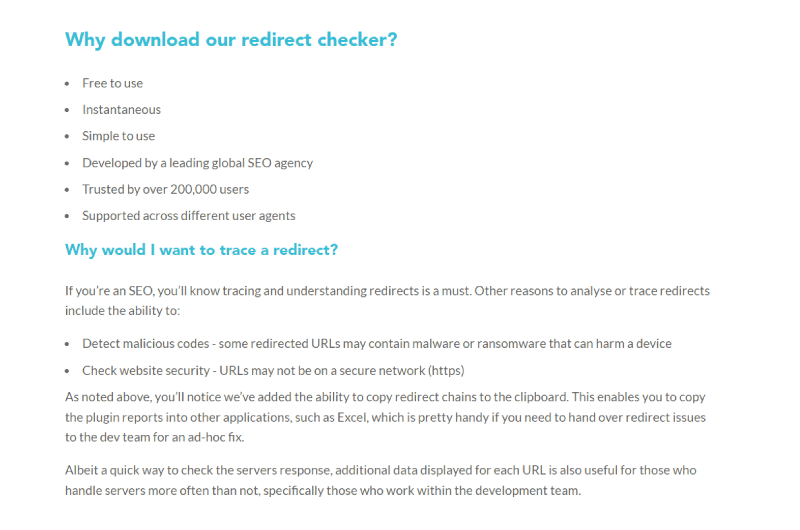
Also, as an SEO, you know tracking and understanding redirects is a must. Other reasons to scan or trace redirects include the ability to:
Detect malicious code : Some redirected URLs are likely to contain malware or ransomware that can harm a device.
Check website security : URLs may not be on a secure network (HTTPS).
Features of Ayima’s Redirect Path
Tool This tool lets you see a lot about your redirects and page loads.
Verifying Server
Redirection Redirect Path presents an overview and visual representation of the redirection in question. It also provides details for each request URL so users can see:
- 301 vs 302 redirects;
- Redirection from HTTP to HTTPS;
- Redirect chains with HTTP response headers and body.
Request headers
Besides already reporting redirects and errors, the Redirect Path plugin also shows other HTTP headers such as:
- Server types;
- X-Robots beacon;
- Cookies ;
- Caching;
- Server IP address.
This is extremely useful for those setting up or maintaining a server.
Client-Side Redirect
Checker Detecting HTTP status codes is one thing, detecting client-side redirects is another. Ayima’s redirect checker brings with it client-side redirect detection.
The Redirect Path tool can detect: JavaScript redirects and Meta Redirects.
How to use Ayima’s Redirect Path?
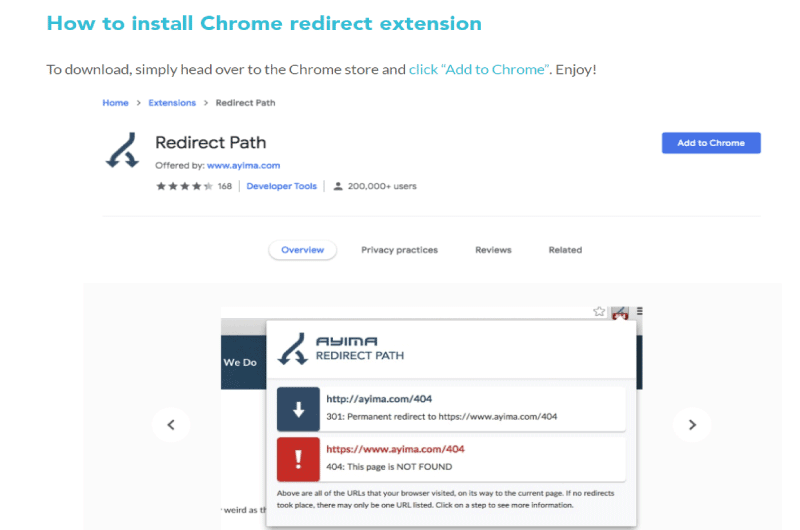
To use the redirect checker, you must first install it. This tool is an extension that is available in the Chrome Web Store. Just go to this Store and search Ayima Redirect Path then add it to your browser.
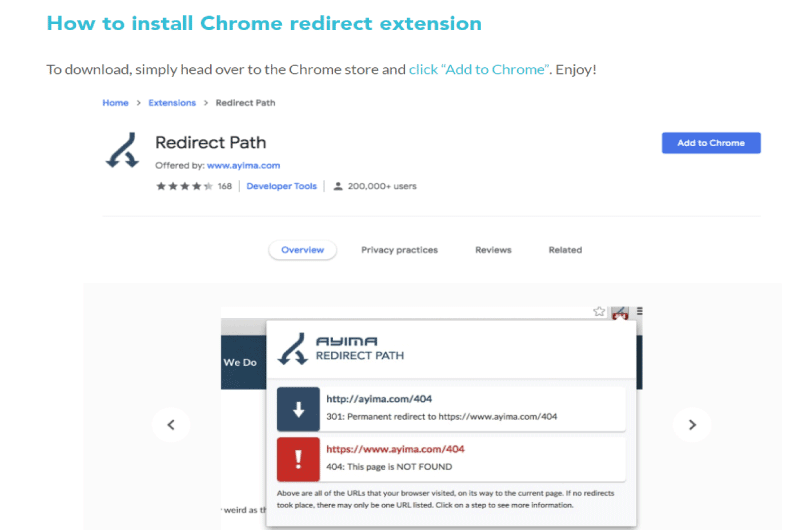
As for how the extension works, you can trace the path from the click to the page. You will be able to see this immediately after clicking on the icon in the browser.
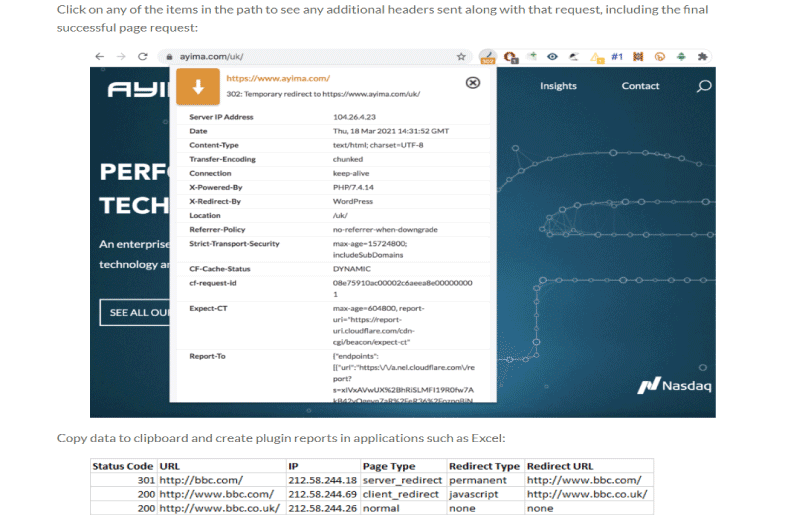
It is also possible to export this information to, for example, Excel. You will notice that the plugin allows redirect chains to be copied to the clipboard.
This is quite handy if you need to escalate redirect issues to a development team for a ad-hoc fix.
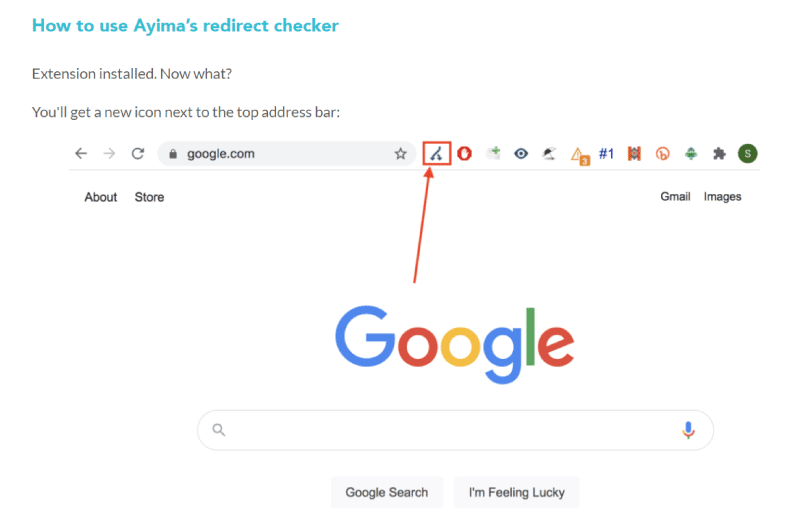
In order to use the tool, after installation you will have a new icon as mentioned before:
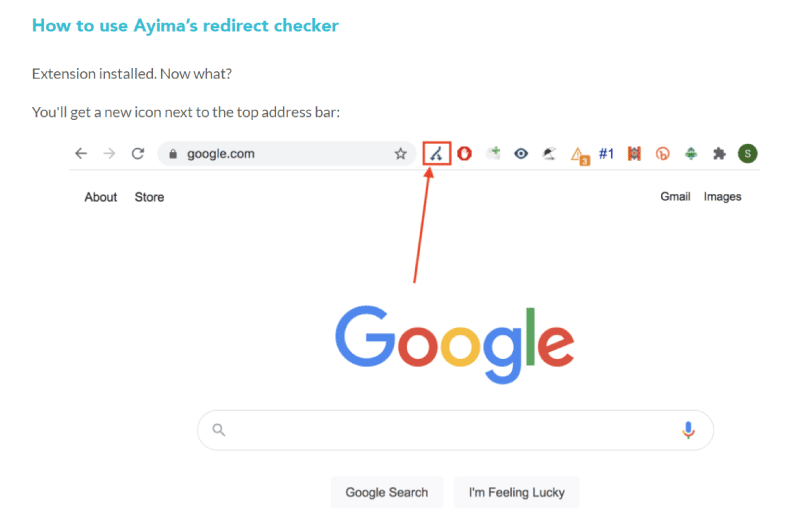
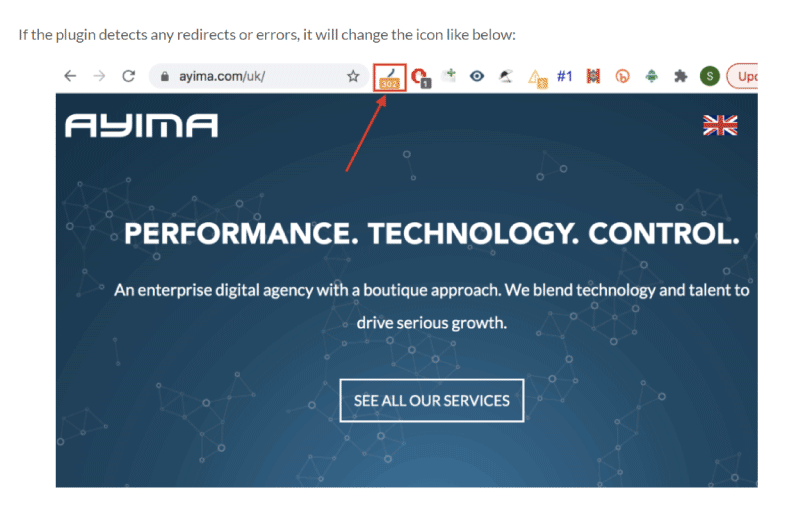
If the plugin detects any redirects or errors, it will change the icon as below:
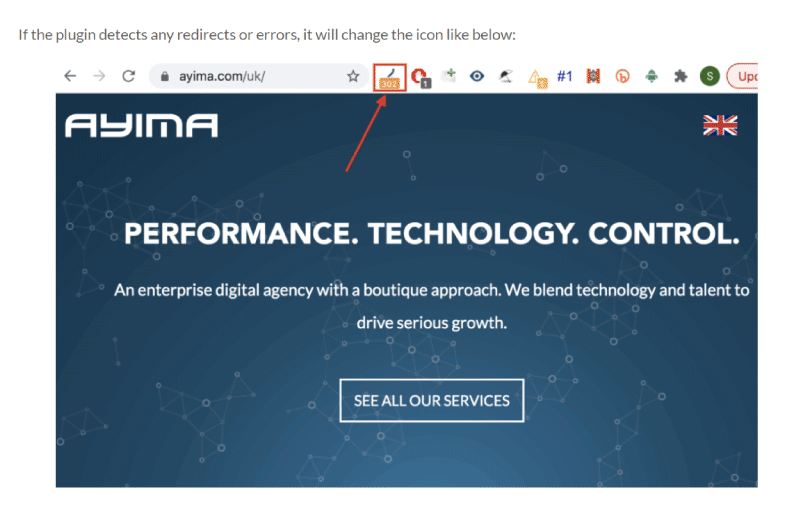
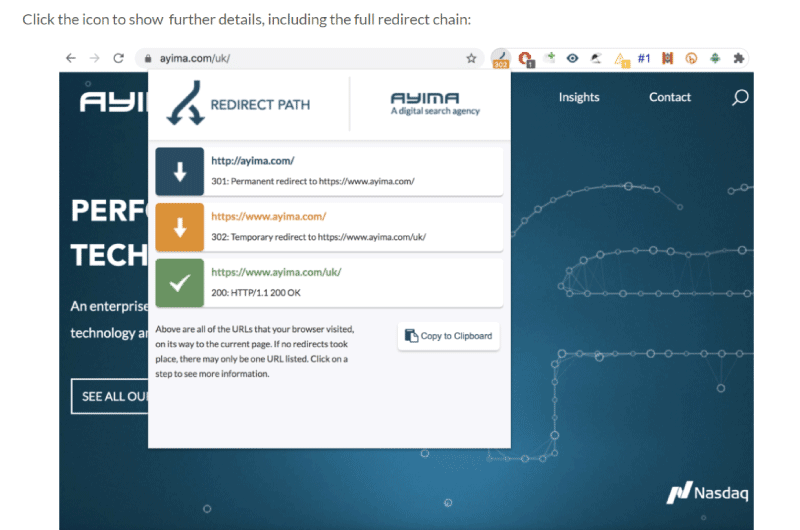
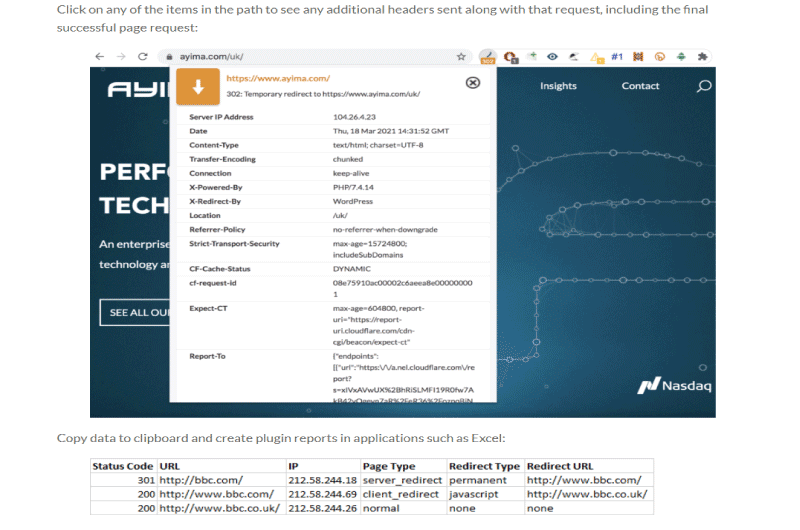
Click on the icon to view additional details , including the full redirect chain:
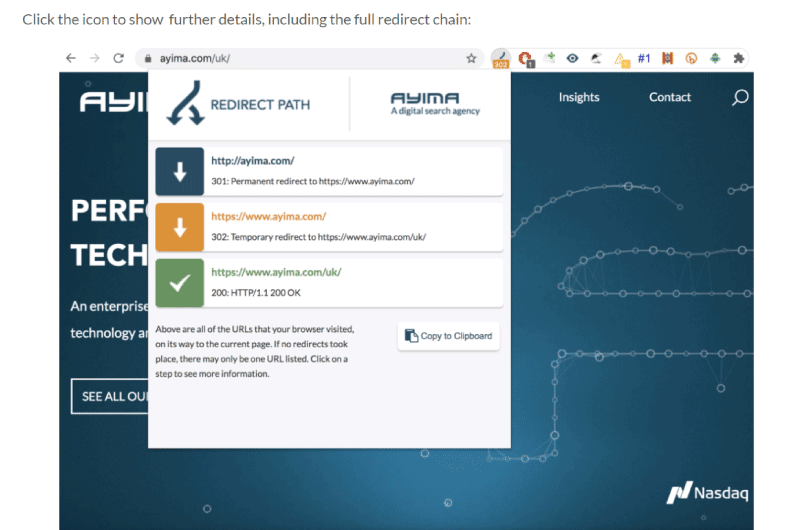
Click any of the path items to view the additional headers sent with this request, including the final successful page request.
Copy data to clipboard and create plugin reports in applications like Excel:
What is the benefit of Ayima Redirect Path on SEO?
This extension can be beneficial for your SEO if you can redirect without problems from your website.
Indeed, if the redirects are not working properly, Google tends to see a problem. It should be noted that Ayima Redirect Path has absolutely no direct impact on your SEO.
It is mainly a tool for self-control. Also note that more problems in your links will lead to a lower position, but fewer problems will not guarantee a better position in the results list.
In short, the Ayima Redirect Path tool is an extension that can immediately draw your attention to potential problems that have not been detected about your redirects.
It also allows you to quickly view and analyze all other response codes generated when loading a page.
About Ayima - Chrome Web Store (Plugin)
Ayima is a company founded on human excellence and technological expertise. Her main objective is to guide her clients through digital by offering them strategic advice and tactical support.
Ayima is a renowned and specialized consulting firm with a lot of experience in natural and paid SEO techniques, programming and data analysis.
With its impressive creativity and reputation, Ayima has grown into a global agency serving some of the world’s biggest brands with offices in London, New York, San Francisco, Raleigh, Vancouver, Stockholm and Hong Kong.